
VedaQL — turn your database into secure APIs in minutes.
Write the query you already know. Get a versioned, cached, logged API — without building a backend.
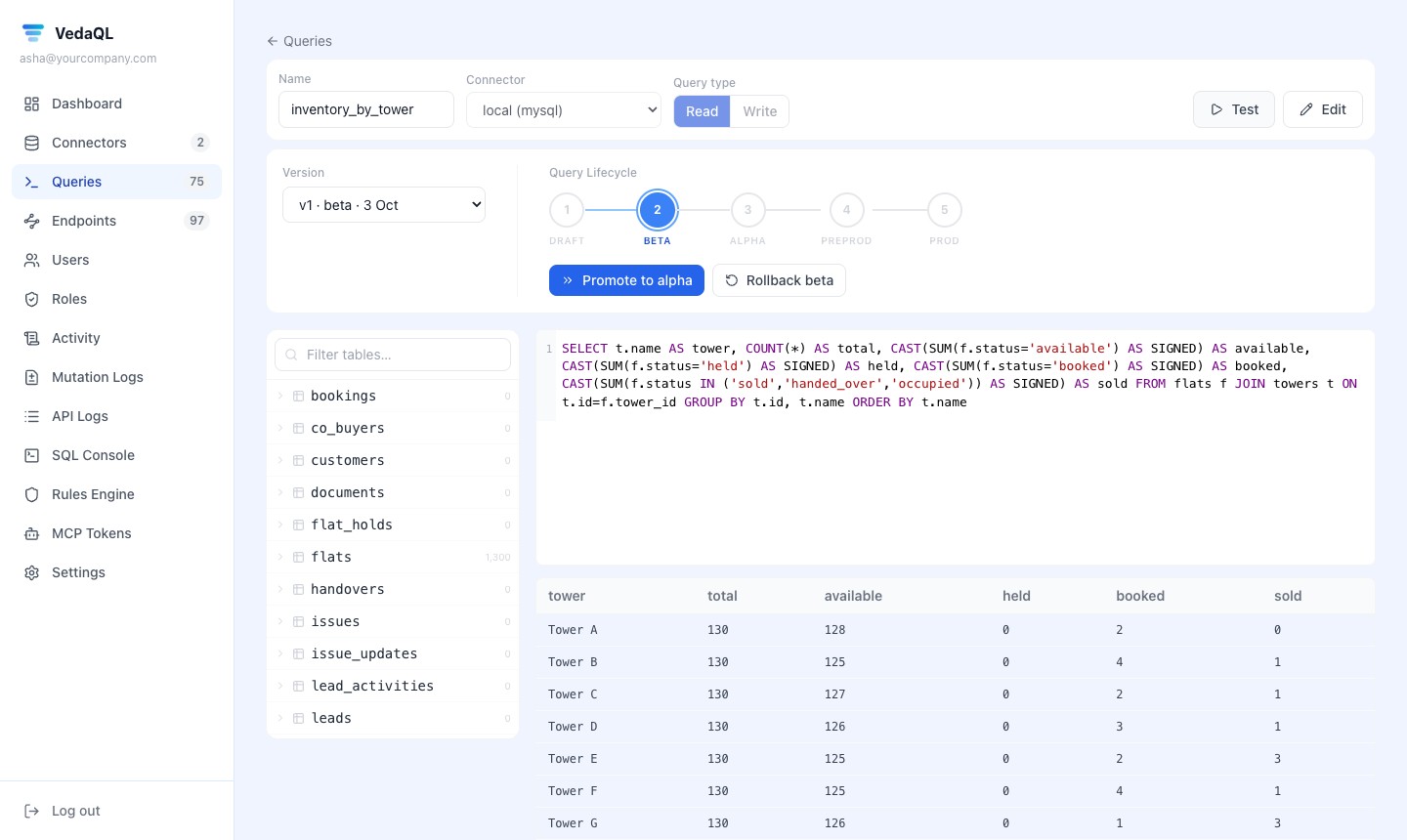
The real VedaQL query screen: the tables on the left, the SQL, a test run with its rows — and the stage this version has reached.
Four steps. No backend code.
What you would normally ask a developer to build — done in the VedaQL screens.
- 01
Connect
Add your database with SSL or through an SSH tunnel. VedaQL shows a ready script to make a restricted database user, and you choose which operations it may run.
- 02
Write the query
Browse the tables, write the query, mark it read or write, and run it. Inputs like {{region}} are filled in safely by type.
- 03
Shape the endpoint
Name and version it, turn on paging, sorting and filters, choose who may call it (browser, server or both) and set your own answer and error format.
- 04
Promote it
Test it with a click or the curl command, then move it from draft to production. Every stage has its own address.
The real screens.
From adding a database to watching every call — this is what you work with.
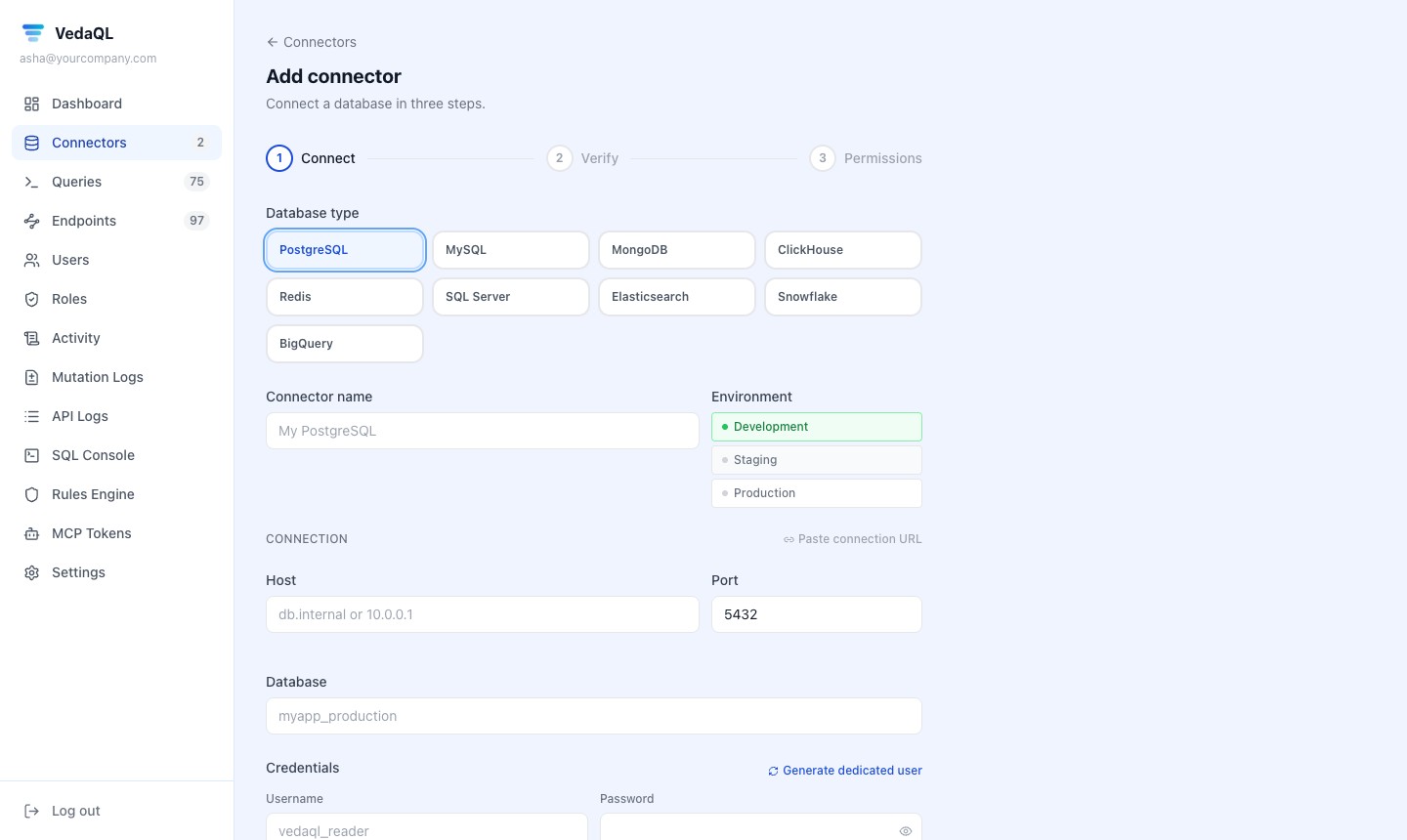
Add your database
Pick one of nine database types, mark it development, staging or production, and choose which operations it allows. SSL and SSH tunnels built in.
One call. Rows back.
Send the inputs, and paging, sorting or filters if you want them. VedaQL checks the caller, runs the query and answers with JSON — from the cache when it can.
- Filters: equals, not equals, greater / less than, like
- Paging with totals, sorting by allowed columns
- Your own answer and error format if you need one
- One-click OpenAPI file and a curl example for each endpoint
/unpaid-invoices/v3X-API-Key: vql_••••3f9a { "params": { "region": "south" }, "pagination": { "page": 1, "per_page": 20 }, "sort": { "column": "due_date", "dir": "asc" } }{ "data": [ { "customer_name": "R. Menon", "amount": 1180, "due_date": "2026-09-15" }, … ], "pagination": { "page": 1, "total": 46, "total_pages": 3 } }APIs without building a backend.
Everything between your database and the apps that need its data.
Use the database you have
Nine kinds of database, over SSL or an SSH tunnel. No copying, no migration.
Query in, API out
Write SQL, a Mongo or a Redis command, save it, and it becomes an API endpoint. Inputs like {{region}} come from the caller, checked by type.
Test before live
Each version moves one stage at a time, with its own address, and the approver is recorded. Roll back any time.
Fast
Cache per endpoint: filled on demand, or refreshed on a schedule before it runs out. Skip it for one call when you need fresh data.
Secure
API key, JWT, Basic or Bearer sign-in, rate limits, IP allow and block lists, and database passwords encrypted with AES-256.
See every call
Every call logged: status, time, rows, cache hit and errors. Dashboards with p95 time and error rate.
AI-ready
An AI assistant can build queries and endpoints for you, and any endpoint can be switched on as a tool for assistants — through MCP.
Starting from nothing?
Create tables in the SQL console and change columns in a spreadsheet-like editor, then build on top of them.
Your database, guarded.
Who may call, how often, from where — and what each team member may see.
Sign-in for callers
API key, JWT, Basic or Bearer — set per group of endpoints. Keys are stored hashed.
Rate limits
A limit for each company and a requests-per-minute limit for each group of endpoints.
IP rules
Allow lists and block lists per group of endpoints.
Automatic blocking
Rules watch the logs for too many calls, errors or slow answers, and can block an IP for a while.
Encrypted passwords
Database passwords and SSH keys are encrypted with AES-256 — keys kept locally, in AWS or GCP KMS, or in Vault.
Table and column rights
Per person: hide tables or columns, and choose read or write — in the console, queries and AI tools.
Two-step sign-in
Team members can turn on authenticator codes, with a password policy for the company.
Change log
Every write is logged, with a copy of the rows before an update or delete.
Between your database and everything that needs its data.
Without VedaQL, every new screen or app needs someone to write and maintain backend code just to read and update records. With VedaQL, you write the query and the API is ready.
- Your data stays in your database
- One place for all your APIs, with versions and logs
- Use the APIs in VedaUI, your own apps, or an AI assistant
Your databases
PostgreSQL · MySQL · SQL Server · MongoDB · and more
Draft → beta → alpha → pre-prod → prod
VedaUI
Screens and portals
Your apps
Web, mobile, other systems
AI assistants
Through MCP
About VedaQL.
Does VedaQL copy my data?
No. It runs your queries against your own database when an endpoint is called. Answers can be cached for a short time if you turn caching on.
Which databases does it work with?
PostgreSQL, MySQL, SQL Server, MongoDB, Redis, ClickHouse, Elasticsearch, Snowflake and BigQuery.
Can it write data, not just read it?
Yes. Mark a query as a write query. You also choose which operations each connection allows — SELECT, INSERT, UPDATE, DELETE.
Can I use the APIs outside VedaUI?
Yes. Call them from any app or system, export an OpenAPI file for your developers, or let an AI assistant use them through MCP.
How do I try it?
Start the free trial: sign in to VedaQL and it sets up your own database to try things on, for 7 days.
VedaQL works on its own for any app, and powers VedaUI screens.
Call your endpoints from any system — or add them to VedaUI as connectors and put the data on a page in a few clicks.
Ready to turn your database into APIs?
Sign up and get your own database to try it on — free for 7 days. No card needed.